> ## Documentation Index
> Fetch the complete documentation index at: https://docs.transmuter.3mergen.com/llms.txt
> Use this file to discover all available pages before exploring further.
# Billing and Plans
> Understand Transmuter's pricing plans, billing modes, and how to manage your subscription.
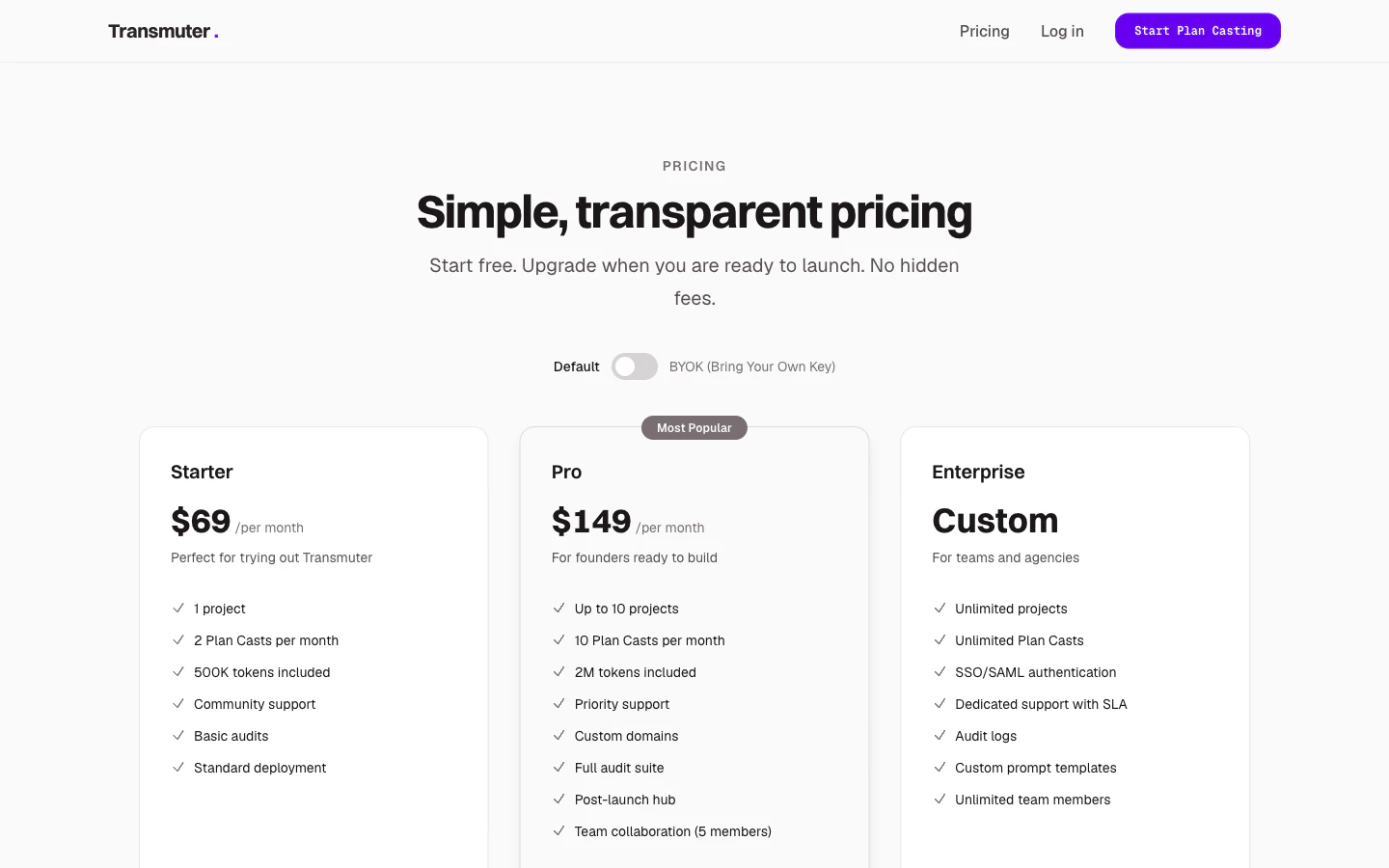
Transmuter offers flexible pricing to match your needs, with two billing modes: **Default** (all-inclusive) and **BYOK** (bring your own key for lower platform costs).
 ## Plans at a glance
| | Starter | Pro | Enterprise |
| -------------------- | ---------- | ----------- | ------------------ |
| **Default mode** | \$69/month | \$149/month | Custom |
| **BYOK mode** | \$29/month | \$59/month | Custom |
| Active projects | 1 | Up to 10 | Unlimited |
| Plan Casts per month | 2 | 10 | Unlimited |
| AI tokens (Default) | 500K | 2M | Custom |
| Team members | 1 | 5 | Unlimited |
| Custom domains | -- | Included | Included |
| Full audit suite | -- | Included | Included |
| Post-Launch Hub | -- | Included | Included |
| SSO/SAML | -- | -- | Included |
| Support | Community | Priority | Dedicated with SLA |
## Default vs. BYOK mode
Transmuter provides the AI processing power. Your subscription price covers everything -- no extra accounts or API keys needed. Best for non-technical users who want the simplest experience.
You provide your own Anthropic API key, and pay Anthropic directly for AI usage. Your Transmuter subscription is lower because it covers only the platform. Best for technical users or high-volume users who want cost control.
See [BYOK (Bring Your Own Key)](/concepts/byok) for setup details.
## Add-ons
Need more than your plan includes? Add-ons are available on any plan:
| Add-on | Price | Notes |
| --------------- | ------------------ | ------------------------------------------ |
| Extra Plan Cast | \$25 each | Available in both modes |
| Extra AI tokens | \$15 per 500K | Default mode only |
| Priority queue | \$30 per Plan Cast | Moves your build to the front of the queue |
## Managing your subscription
Navigate to **Settings > Billing** from the sidebar. You will see your current plan, usage, and billing history.
Click **Change Plan** to see available options. Upgrades take effect immediately. Downgrades take effect at the end of your current billing period.
When downgrading, if you exceed the lower plan's limits (for example, you have 3 active projects but Starter only allows 1), you will need to archive extra projects before the downgrade takes effect.
You can switch between Default and BYOK mode from the billing settings. Switching takes effect at the start of your next billing period.
## Billing per workspace
Each workspace has its own subscription and billing. If you have multiple workspaces, each one is billed independently. This is useful for consultants and agencies who manage separate client workspaces.
## Payment methods
Transmuter accepts all major credit and debit cards. Payment is processed securely through Stripe.
## Viewing usage and history
The billing settings page shows:
* Current month's usage (Plan Casts used, tokens consumed)
* Historical usage and billing statements
* Upcoming renewal date and amount
## Plans at a glance
| | Starter | Pro | Enterprise |
| -------------------- | ---------- | ----------- | ------------------ |
| **Default mode** | \$69/month | \$149/month | Custom |
| **BYOK mode** | \$29/month | \$59/month | Custom |
| Active projects | 1 | Up to 10 | Unlimited |
| Plan Casts per month | 2 | 10 | Unlimited |
| AI tokens (Default) | 500K | 2M | Custom |
| Team members | 1 | 5 | Unlimited |
| Custom domains | -- | Included | Included |
| Full audit suite | -- | Included | Included |
| Post-Launch Hub | -- | Included | Included |
| SSO/SAML | -- | -- | Included |
| Support | Community | Priority | Dedicated with SLA |
## Default vs. BYOK mode
Transmuter provides the AI processing power. Your subscription price covers everything -- no extra accounts or API keys needed. Best for non-technical users who want the simplest experience.
You provide your own Anthropic API key, and pay Anthropic directly for AI usage. Your Transmuter subscription is lower because it covers only the platform. Best for technical users or high-volume users who want cost control.
See [BYOK (Bring Your Own Key)](/concepts/byok) for setup details.
## Add-ons
Need more than your plan includes? Add-ons are available on any plan:
| Add-on | Price | Notes |
| --------------- | ------------------ | ------------------------------------------ |
| Extra Plan Cast | \$25 each | Available in both modes |
| Extra AI tokens | \$15 per 500K | Default mode only |
| Priority queue | \$30 per Plan Cast | Moves your build to the front of the queue |
## Managing your subscription
Navigate to **Settings > Billing** from the sidebar. You will see your current plan, usage, and billing history.
Click **Change Plan** to see available options. Upgrades take effect immediately. Downgrades take effect at the end of your current billing period.
When downgrading, if you exceed the lower plan's limits (for example, you have 3 active projects but Starter only allows 1), you will need to archive extra projects before the downgrade takes effect.
You can switch between Default and BYOK mode from the billing settings. Switching takes effect at the start of your next billing period.
## Billing per workspace
Each workspace has its own subscription and billing. If you have multiple workspaces, each one is billed independently. This is useful for consultants and agencies who manage separate client workspaces.
## Payment methods
Transmuter accepts all major credit and debit cards. Payment is processed securely through Stripe.
## Viewing usage and history
The billing settings page shows:
* Current month's usage (Plan Casts used, tokens consumed)
* Historical usage and billing statements
* Upcoming renewal date and amount